
Master Software Deployment Best Practices: Your Actionable Guide to CI/CD Success
Software deployment best practices are the set of rules that separate high-performing teams from the rest. They transform risky, all-night release marathons into a smooth, automated, and repeatable process. The goal is simple: make every deployment a non-event.
This guide provides an actionable blueprint for achieving that. We'll focus on the practical steps to automate builds and tests, maintain perfectly consistent environments, and leverage smart rollout strategies to deliver value to users faster and without the drama.
The Blueprint for Flawless Software Deployment
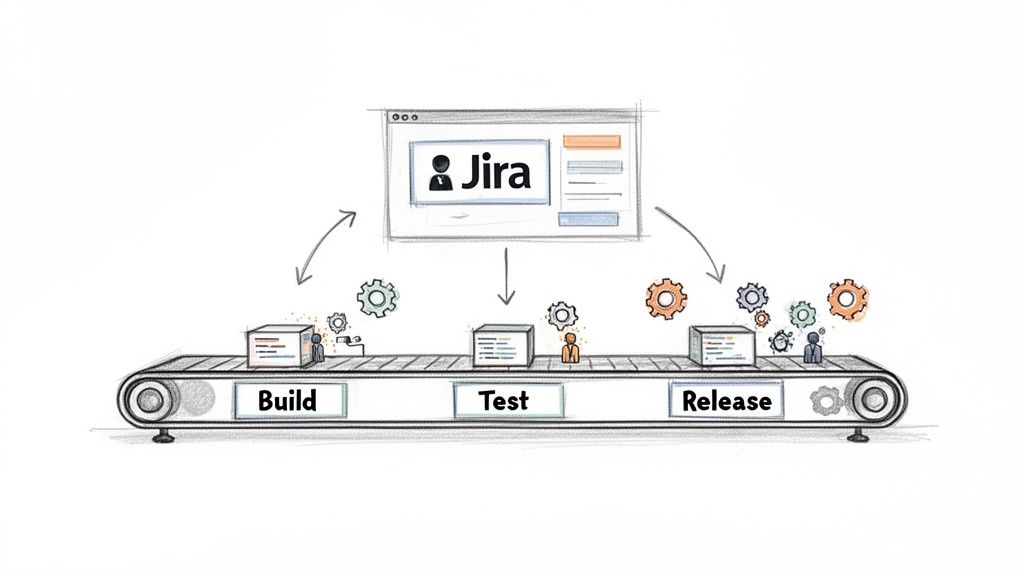
Forget the "big bang" releases of the past. Modern software deployment is about a continuous stream of small, low-risk changes delivered through a robust pipeline. This pipeline is your automated assembly line for code, moving it from a developer's commit to production with automated quality gates at every stage.
To build this system, you need to implement a set of core principles. Here’s what you need to focus on.
Key Software Deployment Best Practices at a Glance
This table provides a quick, scannable summary of the core actions you need to take for reliable software deployments.
| Best Practice | Your Actionable Task | Primary Benefit |
|---|---|---|
| Automation | Script every step: builds, tests, environment setup, and deployments. | Eliminates human error, accelerates delivery, and frees up engineers. |
| CI/CD | Set up a pipeline that automatically builds and tests every commit. | Catches bugs in minutes, not weeks, enabling smaller, faster releases. |
| Consistent Environments | Use Infrastructure as Code (IaC) to define all environments (dev, stage, prod). | Eradicates "it works on my machine" issues for predictable deployments. |
| Observability | Implement tools for centralized logging, metrics, and tracing in production. | Provides immediate insight into application health and user impact. |
| Rollback Strategy | Document and test a one-click or single-command rollback procedure. | Minimizes downtime and turns potential disasters into minor hiccups. |
| Security baked in | Add automated security scans (SAST/DAST) as mandatory steps in your pipeline. | Finds and fixes vulnerabilities before they ever reach production. |
Implementing these practices isn't about adding bureaucracy; it's about building a system that makes doing the right thing the easiest thing.
From Chaos to Control
Transforming your deployment process from a source of anxiety into a competitive advantage requires a shift in mindset and tooling. Here are the actionable principles to guide you:
- Automate First: Identify every manual step in your current process. Prioritize automating the most repetitive and error-prone tasks first.
- Consistency is Key: Use tools like Docker and Terraform to define your environments in code. This makes them perfectly reproducible and eliminates configuration drift.
- Plan for Failure: Your deployment is not complete until you have a tested rollback plan. Run regular fire drills to ensure you can revert a failed deployment instantly.
- Centralized Orchestration: Use a tool like Jira as your command center. Configure it to track the status of deployments, manage approvals, and automate handoffs between your pipeline and your team.
A mature deployment pipeline doesn't just move code; it enforces quality. Implement automated checks at each stage to create a system where developers can release with confidence.
Why Jira Is Your Command Center
Throughout this guide, we'll show you how to use Jira as the operational hub for your deployment pipeline. It’s where you can track work, manage approvals, and trigger automated workflows.
Here’s a practical example: a developer merges code, triggering a webhook that starts a build. Once the build passes tests and deploys to staging, the pipeline sends a signal back to Jira. The ticket automatically transitions to "Ready for QA" and is assigned to the correct tester. This eliminates manual updates and ensures the process keeps moving.
Automating Your Path to Production with CI/CD
If your deployment process is an assembly line, Continuous Integration and Continuous Deployment (CI/CD) is the robotics system that makes it run. It replaces slow, manual handoffs with a fast, reliable, and automated workflow. This is the engine that drives modern software delivery.
The principle is simple: integrate small code changes frequently and deploy them continuously. Continuous Integration (CI) automatically builds and tests every code change, catching bugs immediately. Continuous Deployment (CD) then automatically releases every change that passes all tests directly to production. This feedback loop is a game-changer, cutting the cost and effort of fixing bugs by finding them in minutes instead of weeks.
The CI/CD Assembly Line in Action
Your CI/CD pipeline acts as a series of automated quality gates. Here is the step-by-step flow you should implement:
- Commit Stage: A developer pushes code to a Git repository. This action is the trigger for the entire pipeline.
- Build Stage: A CI tool like Jenkins, GitLab CI, or CircleCI detects the change, pulls the code, and compiles it. If the build fails, the pipeline stops and notifies the developer immediately.
- Test Stage: The compiled code is subjected to a suite of automated tests. Start with unit tests for individual functions and then run integration tests to ensure all components work together correctly. A failed test must stop the deployment.
- Deploy Stage: Once all tests pass, the CD portion of the pipeline deploys the code to a staging environment for final validation before being pushed to production.
This automated sequence ensures every line of code is rigorously vetted before a customer sees it, making your deployments faster and safer.
The Power of Automation at Scale
Teams that fully implement CI/CD operate at a different level. According to DevOps Research and Assessment (DORA) metrics, elite teams deliver software 2.5 times faster than their peers. Companies like Netflix and Amazon deploy thousands of times per day, making releases a routine business operation. You can explore more of these powerful DevOps statistics and their impact on mend.io.
CI/CD isn't just about speed; it's about building confidence. Create a robust safety net of automated tests so your team can release updates knowing that errors will be caught long before they become customer-facing problems.
Jira as Your CI/CD Control Tower
While your CI/CD tools handle the technical execution, use Jira to orchestrate the overall workflow. Connect your pipeline to your project management process for end-to-end visibility.
For example, configure a webhook from your CI tool to update a Jira ticket automatically. When a build deploys to staging, the Jira status should flip from "In Progress" to "Ready for QA," and the ticket should be assigned to the test lead. This eliminates communication gaps. To learn how to connect different tools and automate these sequences, investigate how process orchestration connects tools and automates complex sequences. This creates a single source of truth where anyone can see the exact status of a feature at a glance.
Choosing Your Deployment Strategy to Minimize Risk
With a CI/CD pipeline in place, your next decision is how to release new code to users. Choosing the right deployment strategy is about controlling the "blast radius"—limiting the impact if something goes wrong. This is not a one-size-fits-all decision; you must select the strategy that best matches your application's risk profile.
Here are the most effective strategies teams use to de-risk their releases.
Canary Deployments: Testing the Waters
A canary deployment is your early warning system. Instead of releasing a new version to all users at once, you roll it out to a small subset, like 1% of your traffic.
Monitor this group closely. Track key metrics like error rates, latency, and user engagement. If the metrics remain healthy, gradually increase the traffic to the new version—from 1% to 10%, then 50%, and finally 100%. If you detect any issues, you can instantly roll back by routing all traffic back to the old, stable version. This turns a high-stakes release into a controlled, data-driven experiment.
Blue-Green Deployments: A Seamless Switch
A blue-green deployment requires two identical production environments: "Blue" (the current live version) and "Green" (the new version).
First, deploy the new version to the idle Green environment. Here, you can run a final round of tests against a production-like setup without affecting any users. Once you have full confidence, you update your router or load balancer to redirect all traffic from Blue to Green.
The switch is instantaneous, resulting in zero downtime for users. The old Blue environment remains on standby, ready for an immediate rollback if any problems arise in the Green environment.
Rolling Deployments: A Gradual Update
With a rolling deployment, you update application instances incrementally, one by one or in small batches. For example, if your application runs on ten servers, you update server one, verify it passes health checks, and then proceed to server two.
This method avoids downtime since healthy instances are always available to serve traffic. It is generally simpler to implement than blue-green, but it introduces a brief period where both old and new versions run simultaneously, which can create compatibility challenges if not managed carefully.
This diagram highlights the core message: manual processes lead to errors, while an automated pipeline is the foundation for successful, reliable deployments.
Automation is the non-negotiable prerequisite for predictable and repeatable releases.
How to Choose the Right Strategy
Your choice of strategy depends on your application's architecture and your team's tolerance for risk. For critical applications, start with a canary release that routes just 1-5% of traffic to the new version. This allows you to validate performance with real users before committing to a full rollout. DevOps teams that adopt these practices deploy 46 times more often and resolve incidents 96 times faster. You can find more practical advice in these software deployment best practices on 42coffeecups.com.
Use this table to guide your decision:
| Strategy | Actionable Use Case | Key Consideration |
|---|---|---|
| Canary | Use for high-traffic applications where you need to validate performance with a small percentage of real users. | Requires robust monitoring and traffic-shaping capabilities. |
| Blue-Green | Use for mission-critical services where zero downtime is mandatory and you need to test in a production twin. | Requires maintaining double the infrastructure, which can increase costs. |
| Rolling | Use for simpler applications or monoliths where brief periods of mixed versions are acceptable. | Rollbacks can be more complex than a simple traffic switch. |
The best strategy is the one that allows your team to deliver value to users confidently and with minimal drama.
Building Reliable Environments with Infrastructure as Code
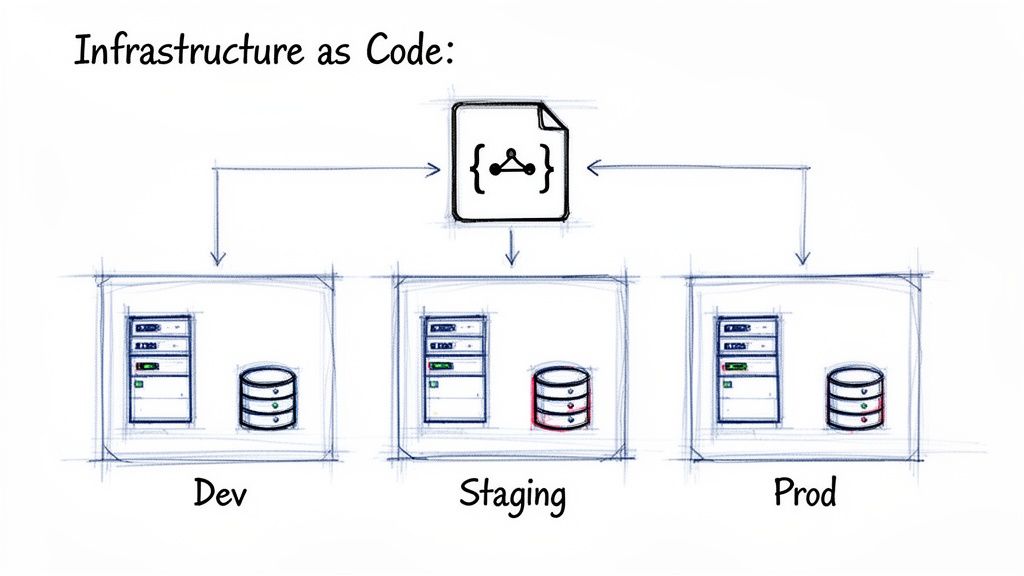
The "it works on my machine" problem is a notorious time-waster caused by inconsistencies between development, staging, and production environments. The solution is Infrastructure as Code (IaC).
IaC is the practice of defining your entire infrastructure—servers, databases, load balancers, and networks—in version-controlled text files. Instead of manually configuring resources, you write a script that can build a perfectly identical environment every time. This script becomes your single source of truth, reviewed and tested just like your application code. It ensures your development, staging, and production environments are not just similar—they are identical.
Eliminating "Configuration Drift" for Good
Configuration drift occurs when manual, ad-hoc changes cause an environment to deviate from its intended state over time. These small tweaks accumulate, making the environment fragile and impossible to replicate.
IaC eliminates drift by enforcing that all changes are made through code. To modify the infrastructure, you update the IaC script, get it peer-reviewed, and apply it automatically. This makes your environments disposable. If you encounter an issue, don't waste time debugging a live server; simply destroy it and provision a fresh, perfect copy from your code in minutes.
Adopt Infrastructure as Code to transform infrastructure management from a manual, error-prone task into a predictable, automated engineering discipline. This is your guarantee that what you test is exactly what you deploy.
Popular IaC Tools and Getting Started
To get started with IaC, choose a tool that fits your team's stack and expertise. Here are the most popular options:
- Terraform: An open-source tool from HashiCorp that is cloud-agnostic. Use it to manage infrastructure across AWS, Azure, and Google Cloud with a single declarative language.
- AWS CloudFormation: The native IaC solution for AWS. Define your resources in YAML or JSON templates and let AWS handle the provisioning.
- Ansible: A configuration management tool from Ansible that can also provision infrastructure. It is known for its simple, agentless architecture and human-readable YAML syntax.
- Pulumi: Define infrastructure using general-purpose programming languages like Python, TypeScript, or Go. This is a great choice for teams that want to use familiar tools.
To adopt IaC, start small. Select one component of your system, like a staging database, and define it using an IaC tool. Commit the code to version control and practice destroying and recreating it. This small win will demonstrate the power of the approach and build momentum.
The Strategic Impact of IaC
Adopting IaC is a significant step in maturing your deployment practices. By treating infrastructure like software, you make it version-controlled, automated, and reproducible. This is a critical enabler for CI/CD, as it drastically reduces the time needed to set up environments and guarantees consistency across your entire pipeline. The data shows that 78% of organizations have already adopted DevOps practices, and over 85% rely on cloud strategies where IaC is essential for scaling. You can learn more about how IaC is shaping modern deployments at configu.com.
Implementing Quality Gates and Rollback Plans
A fast deployment process is useless if it delivers broken code. To ensure stability, you must implement two critical safety nets: quality gates and rollback plans.
A quality gate is a mandatory checkpoint in your deployment pipeline. It is a hard stop where specific, predefined criteria must be met before code can advance to the next stage. These are the non-negotiable rules that protect your production environment.
What Makes a Strong Quality Gate
Effective quality gates are automated and uncompromising. They are the guardians that prevent buggy code from reaching users. Implement these checks in your pipeline:
- Automated Test Success: Require 100% pass rates for all unit, integration, and end-to-end tests. No exceptions.
- Code Quality Scans: Integrate static analysis tools to check for code complexity, duplication, and adherence to style guides. Fail the build if standards are not met.
- Security Vulnerability Scans: Use automated security tools (SAST/DAST) to scan for known vulnerabilities in your code and its dependencies. Block any release that introduces a critical security flaw.
- Performance Thresholds: Run automated performance tests to ensure the new code does not degrade response times or increase resource consumption beyond acceptable limits.
- Manual Approvals: For critical releases, configure your pipeline to require a manual sign-off from a QA lead or product manager directly within a tool like Jira.
By automating these checkpoints, you codify your Definition of Done directly into your pipeline, ensuring every release meets the same high standard.
Planning for Failure with Rollback Strategies
Despite your best efforts, failures in production will happen. When they do, you need a reliable "undo" button. This is your rollback plan.
A rollback plan is your acknowledgment that perfection is unattainable and your commitment to minimizing impact when issues arise. A tested rollback strategy is what turns a potential catastrophe into a minor, quickly resolved incident.
Every deployment must have a clear, documented, and regularly tested procedure for reverting to the last known good state. Without one, you are simply hoping for the best—a failed strategy in software engineering.
Automated Versus Manual Rollbacks
Your rollback procedure should be as fast and safe as possible. Here are the two primary approaches:
| Rollback Type | Description | Actionable Advice |
|---|---|---|
| Automated | The CI/CD pipeline or a monitoring tool detects a critical failure (e.g., a spike in 500 errors) and automatically triggers a revert to the previous version. | Implement this for Blue-Green or Canary deployments where a rollback is a simple traffic switch. Configure alerts to trigger the rollback automatically. |
| Manual | An on-call engineer follows a documented checklist to redeploy the previous stable version of the application. | Use this for complex systems or database migrations. The checklist must be clear, concise, and tested regularly in a staging environment. |
The most critical action is to test your rollback procedure regularly. Run fire drills in a non-production environment to ensure the process works and your team knows exactly what to do. To streamline these approval and reversal steps, explore guides on what workflow automation is and how it can help to build more resilient processes.
Putting It All Together: A Practical Jira Workflow for Software Deployment
All these best practices come together in your daily workflow, and for most teams, the hub of that workflow is a Jira ticket. A well-configured Jira workflow transforms a simple task into a command center for your entire deployment process, making best practices a concrete and repeatable reality.
Here is a step-by-step walkthrough of an automated, quality-driven deployment workflow managed in Jira.
From Development to Staging
The process starts when a developer moves a ticket to "In Progress" and creates a feature branch. When they push their first commit, automation kicks in:
Your CI/CD pipeline is triggered instantly. It builds the code and runs all unit and integration tests. If any test fails, the pipeline stops and notifies the developer immediately, creating a tight feedback loop.
Once all tests pass, the pipeline automatically deploys the feature to the staging environment. This triggers another automated action.
Configure your CI tool to call the Jira API. The Jira ticket's status automatically changes from "In Progress" to "Ready for QA," and the ticket is assigned to the QA lead. This handoff happens without any manual intervention.
The QA Approval Quality Gate
Now the ticket is with the QA team, representing a critical quality gate. The QA engineer tests the feature in the staging environment, which is an identical clone of production thanks to Infrastructure as Code.
The goal is to formally validate that the software is stable, meets all acceptance criteria listed in the Jira ticket, and is secure. To enforce this, build mandatory checks directly into your Jira workflow. For example, use an app like Harmonize Pro to add a structured checklist that must be completed before the ticket can be advanced.
This makes your Definition of Done explicit and impossible to bypass. The ticket cannot move forward until every quality check is verified.
Deploying to Production and Closing the Loop
Once QA completes the final checklist item, another automation rule fires, preparing the ticket for its final journey to production.
- Approval for Production: The ticket transitions to "Ready for Release." This can trigger a notification to a product manager or release manager for final business-level approval.
- Production Deployment: With the final green light, the release engineer triggers the production deployment, using a Canary or Blue-Green strategy to ensure a safe rollout.
- Post-Deployment Monitoring: After deployment, the ticket moves to a "Monitoring" status while the team watches performance dashboards and logs to confirm stability.
- Done: Once the release is stable in production, the ticket is moved to "Done."
The entire history of the deployment—from the first commit to the final release, including all automated checks and manual approvals—is now captured in a single Jira ticket. This is the power of effective Jira workflow automation: it connects your tools and teams into one unified, reliable system.
Common Questions About Software Deployment
Here are answers to common questions that arise as teams work to improve their deployment processes.
What's the Single Most Important Practice for a Small Team?
For a small team, the highest-impact action you can take is to set up a basic CI/CD pipeline.
Automating your build and test process provides the biggest return on investment. It saves time, reduces human error, and creates a solid foundation that you can build upon as your team grows. Start here.
How Should We Handle Database Migrations?
Treat database migrations as first-class citizens of your deployment process, not afterthoughts.
Follow these practical steps:
- Version control everything. Store all migration scripts in your Git repository alongside your application code.
- Design for failure. Write backward-compatible migrations. This ensures you can roll back your application code without breaking the database.
- Test rigorously. Execute and validate every migration in a staging environment that is an exact replica of production before deploying.
What’s the Real Difference Between Continuous Delivery and Continuous Deployment?
The difference comes down to one final, manual approval step.
Continuous Delivery means every change that passes all automated tests is automatically deployed to a production-like environment. A human must then manually trigger the final release to production.
Continuous Deployment removes the manual step. If a change passes all automated gates, it is automatically released all the way to production without human intervention.
Think of it this way: Continuous Delivery gets the release ready to go, but you still have to press the button. Continuous Deployment presses the button for you.
Turn your software deployment best practices into automated, enforceable workflows with Harmonize Pro. See how our Jira app Nesty can build quality gates and automate handoffs to ensure flawless deployments every time. Learn more and get started.