
What Is Workflow Automation Explained Simply
Let's get right to it. Workflow automation is using technology to run a sequence of tasks automatically based on rules you set. Think of it as creating a digital assembly line for your business processes. Instead of your team manually passing tasks, sending update emails, and entering data, the software handles it for you.
This simple shift frees your team from repetitive work, allowing them to apply their skills to strategic thinking, customer engagement, and creative problem-solving—activities that directly drive business growth.
What Is Workflow Automation and Why It Matters
At its core, workflow automation is the system that ensures data and tasks move smoothly between your people and your software. It’s the practical solution to stop chasing updates through endless email chains and messy spreadsheets. By setting up simple "if this, then that" rules, you build a reliable process that executes perfectly every time.
For instance, you can create a workflow where a new customer signing a contract automatically triggers the creation of their account, sends a notification to the onboarding team, and schedules their kickoff call. This all happens instantly, without anyone needing to manually coordinate the steps.
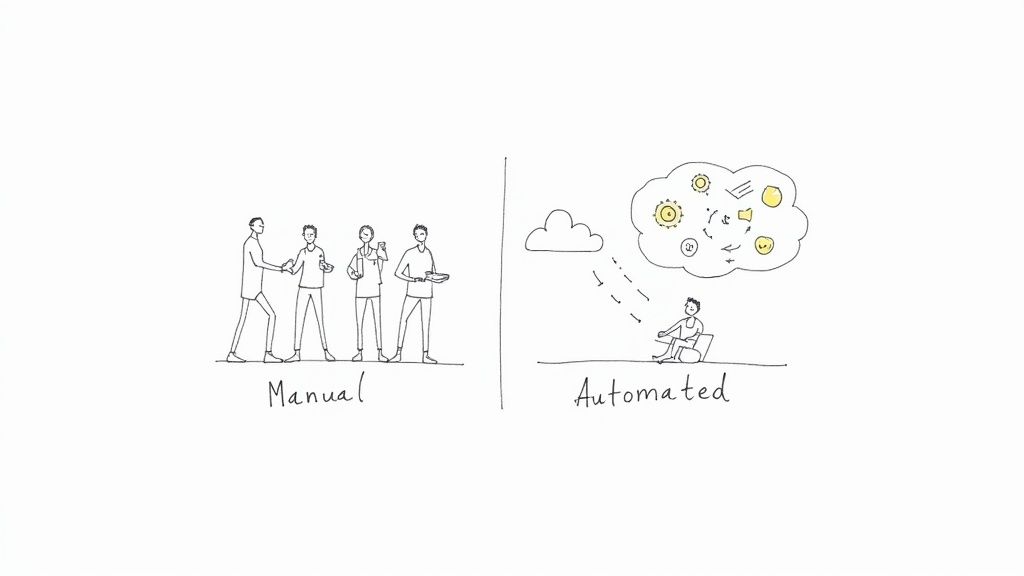
From Manual Effort to Automated Efficiency
The transition from a manual process to an automated one is a game-changer for productivity. Manual workflows are inherently slow, inconsistent, and prone to human error. Critical steps get missed, causing delays, rework, and team-wide frustration. Automation introduces structure and predictability, ensuring your standard operating procedures are actually followed.
To see just how significant this shift is, let's compare the two approaches.
Manual vs Automated Workflows A Quick Comparison
This table breaks down the core differences and their direct impact on your business operations.
| Aspect | Manual Workflow | Automated Workflow |
|---|---|---|
| Execution Speed | Slow, dependent on human availability. | Fast, runs instantly 24/7. |
| Consistency | Varies by person and day; prone to error. | Highly consistent; follows rules precisely. |
| Scalability | Difficult; requires hiring more people. | Easy; handles increased volume without issue. |
| Visibility | Opaque; hard to track status without asking. | Transparent; provides real-time tracking. |
| Team Focus | On repetitive, low-value administrative tasks. | On strategic, high-value creative work. |
| Cost | High operational costs due to labor. | Lower long-term costs; improves resource use. |
The differences are stark, and the business world is taking notice.
The financial case for this shift is compelling. In 2023, the global workflow automation market was valued at around $20 billion and is projected to surge to nearly $37.5 billion by 2030. This growth is driven by the practical need for companies to reduce manual work, accelerate project timelines, and scale operations efficiently. You can find more detail on these workflow automation market trends in recent industry reports.
By automating routine processes, teams can consistently execute their work with higher speed and accuracy. This doesn't just improve productivity; it builds a foundation for scalable operations and allows employees to focus on high-value activities that drive business growth.
Ultimately, understanding what workflow automation is means recognizing its power to transform how your teams collaborate. It's about turning chaotic, manual processes into streamlined systems that run themselves, ensuring no detail is ever missed.
The Three Building Blocks of Automation
To effectively use workflow automation, you need to understand its core components. Every automated process, no matter how complex, is built from three simple parts. This logic is the engine of all automation. Once you grasp these three building blocks—Triggers, Conditions, and Actions—you can design workflows to handle nearly any repetitive task with precision.
Let's break down how to use each one.
Triggers: The Starting Gun
A Trigger is the specific event that initiates an automated workflow. It’s the starting signal that tells the system, "Begin the process." A trigger can be a customer submitting a support ticket, a developer merging code, or a specific date arriving.
Actionable examples of triggers include:
- A new email arrives in a shared inbox like
support@company.com. - A prospect submits a "Request a Demo" form on your website.
- A new file is added to a specific Google Drive or Dropbox folder.
- A Jira issue is moved from "In Progress" to "Ready for QA."
Conditions: The Rulebook
Once a workflow is triggered, it consults the Conditions—a set of rules that must be met for the process to proceed. Conditions act as a filter, ensuring the automation only runs when appropriate. They add logic, asking, "Should I execute this action now?"
For example, your trigger might be "a new invoice is received." A practical condition would be, "Only if the invoice amount is over $1,000." This rule prevents your finance lead from being bothered with minor approvals, saving their time for more critical tasks.
Conditions are the brain of your workflow. They turn a simple, reactive process into an intelligent one that can handle different situations, making sure the right things happen at the right time.
Actions: The Work Itself
Finally, if the trigger event occurs and all conditions are met, the workflow performs one or more Actions. An action is the specific task the system executes for you. This is where the work gets done automatically.
Practical examples of actions include:
- Sending a Slack notification to the
#dev-teamchannel. - Creating a new task in your project management tool and assigning it to the project manager.
- Updating a customer's status from "Lead" to "Active" in your CRM.
- Adding a new row with customer data to a Google Sheet.
By combining these three elements, you can build powerful automations. For instance, a Jira ticket transition (Trigger) for a high-priority bug (Condition) could automatically create a dedicated Slack channel and ping the on-call engineer (Actions). To get more ideas on how different triggers can fire off notifications, you can explore various notification trigger types in Nesty’s documentation.
Seeing Workflow Automation in Action
Theory is helpful, but seeing automation solve real-world problems makes its value clear. Let's examine three common business scenarios where a well-designed workflow can eliminate bottlenecks and improve efficiency. These examples show how triggers, conditions, and actions work together to streamline everyday processes.
This flow—event happens, rule is checked, action is taken—is the engine behind every automation.
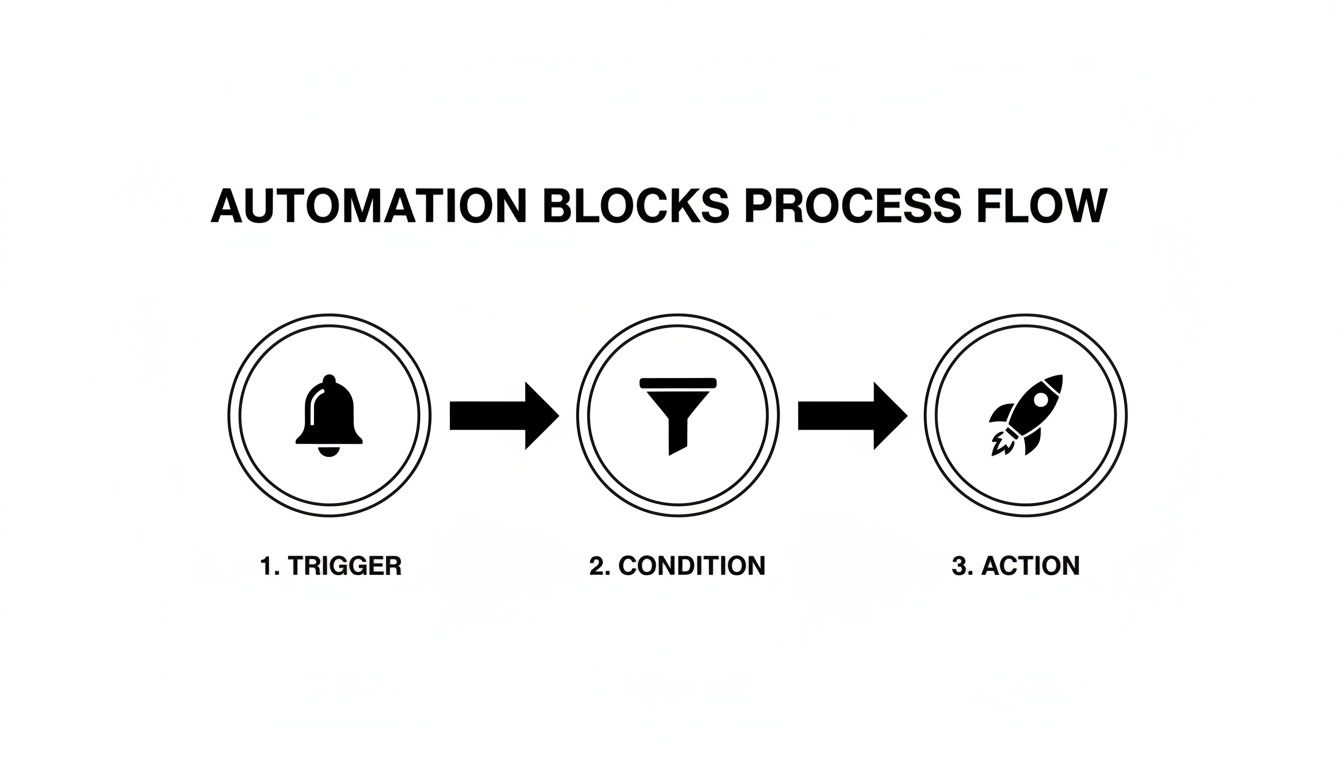
Think of it as a digital domino effect you control. A specific event tips the first domino, a rule decides if the next one falls, and a task is completed at the end of the line.
Example 1: The Developer to QA Handoff
In software development, the handoff from a developer to the quality assurance (QA) team is a frequent bottleneck. A developer merges their code but forgets to update the Jira ticket or notify the QA engineer. The feature sits idle, delaying the release cycle.
An automated workflow eliminates this delay.
- Trigger: A developer merges a pull request into the
mainbranch in GitHub or Bitbucket. - Condition: The linked Jira ticket's current status is "In Progress."
- Actions: The system automatically transitions the Jira ticket's status to "Ready for QA," assigns it to the QA team lead, and sends a notification to the team's Slack channel with a direct link to the ticket.
With this automation, the QA process begins the moment code is ready, ensuring no time is lost and nothing is forgotten.
Example 2: Streamlining New Hire Onboarding
Onboarding a new employee involves numerous tasks across HR, IT, and management: creating accounts, setting up hardware, and scheduling orientation meetings. A manual process is often disorganized, leading to a frustrating first day for the new hire.
Workflow automation transforms this chaos into a seamless, professional experience.
Automating the onboarding process ensures every new hire gets the same great experience. It also frees up your HR and IT teams to focus on the more human side of welcoming someone to the company. A smooth, well-organized first day sets the tone for their entire time with you.
Here’s how to structure the workflow:
- Trigger: An HR manager updates a candidate's status to "Offer Signed" in the company’s HR platform.
- Condition: The new hire’s start date is less than two weeks away.
- Actions: The workflow initiates a series of tasks: it generates an IT ticket to provision a laptop, creates user accounts in necessary systems, and automatically schedules introductory meetings with key team members on their calendar.
This ensures every new employee has everything they need on day one, without anyone relying on a manual checklist. For a more detailed look, you can learn about setting up automated onboarding workflows and see the steps involved.
Example 3: Managing Marketing Content Approvals
Getting a blog post approved via email is often chaotic. The draft is sent, feedback arrives from multiple people, and no one is sure which version is the latest. This back-and-forth slows down content production significantly.
An automated approval workflow brings order to this process.
- Trigger: A writer moves a draft card to the "Ready for Review" column in a tool like Trello or Asana.
- Condition: The content card is tagged as "High Priority."
- Actions: The system automatically @-mentions all required reviewers, setting a clear due date for feedback. As each person marks an "Approved" checklist item, the system tracks progress. Once all approvals are received, the card automatically moves to the "Scheduled for Publishing" column.
The True Business Impact of Automation
Understanding the components is one thing, but what tangible results can you expect? The impact of automation extends beyond speed. It delivers measurable improvements to your bottom line, team morale, and capacity for growth. By removing manual, repetitive work, you change how your team operates, allowing them to achieve more without increasing headcount.
Drive Greater Operational Efficiency
The most immediate benefit is a significant boost in operational efficiency. Automated workflows run 24/7 without breaks. Tasks that previously took hours of manual coordination—like the handoff between development and QA—are now completed in seconds.
This increased speed leads to shorter project cycles and faster delivery of value to your customers. Your entire operation gains a predictable rhythm, allowing your team to manage a larger workload without feeling overwhelmed. This is how you build a process that scales with your business.
Improve Accuracy and Reduce Costly Errors
Human error is inevitable in manual processes. Mistakes in data entry, forgotten steps in a checklist, or miscommunication can lead to costly rework, compliance issues, and dissatisfied customers.
Automation enforces consistency. It executes rules precisely, every single time. By eliminating the potential for human error in repetitive tasks, you dramatically improve data quality and process reliability. This precision not only saves the money and time spent fixing mistakes but also builds trust in your operations.
The real power of workflow automation lies in its ability to create a clear, digital audit trail for every process. It enhances accountability and makes compliance straightforward, as every action, approval, and handoff is automatically logged and time-stamped.
Boost Team Morale and Strategic Focus
No one enjoys a day filled with mind-numbing administrative work. When you automate tedious tasks, you give your team their time and brainpower back. They can finally focus on the high-value, strategic work they were hired for. This isn't about replacing people; it's about elevating their roles.
The impact on job satisfaction is significant. Burnout decreases and employee retention improves. Instead of ticking boxes, your team can dedicate their energy to innovation, customer interaction, and creative problem-solving—the activities that drive your business forward.
It’s no surprise, then, that organizations are prioritizing this shift. Reports show that between 51% and 66% of companies have already automated at least one business process, with many seeing a first-year ROI between 30% and 200%. You can dig into more of these workflow automation statistics to see just how widespread its adoption and impact have become.
Your First Steps to Implementing Automation
Ready to get started? Launching your first automation project doesn't have to be a massive undertaking. The most effective approach is to start small, secure a quick win, and build momentum from there.
By following a clear, step-by-step plan, you can confidently reclaim your team's time and build more reliable processes. Use this as your roadmap for getting your first successful automation implemented.
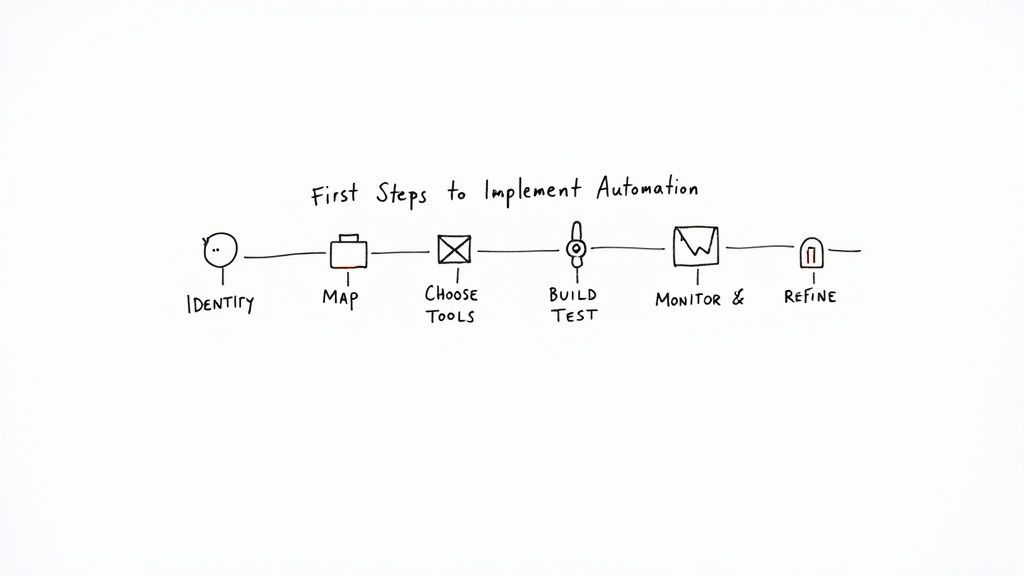
This visual lays out the game plan, from finding the right tasks to making continuous improvements. Let’s walk through each of these steps so you can put them into practice yourself.
Find the Right Tasks to Automate
Start by targeting "low-hanging fruit." Identify tasks that are repetitive, rule-based, and consume a significant amount of your team's time. These low-complexity, high-volume processes are ideal candidates for your first automation.
To find them, ask your team these questions:
- What daily or weekly tasks are the most tedious and time-consuming?
- Where do handoffs between people or teams consistently cause delays?
- Which processes are most prone to simple human errors?
Map Your Current Workflow
Before you automate a process, you must understand it completely. Map out every step as it currently exists. Identify who is responsible for each task, what information they need, and where the bottlenecks occur.
This critical step often uncovers hidden inefficiencies and ensures your automation solves the right problem. Do not skip this.
Choose the Right Automation Tools
The best tool depends on your specific needs and existing software stack. Many platforms you already use, like Jira, have powerful native automation features. For more complex, cross-platform workflows, you might need a dedicated automation tool.
The right tool makes everything feel more intuitive. For teams already deep in Jira, this could mean starting with its native features or grabbing a specialized app from the Atlassian Marketplace to handle more intricate, multi-step processes without ever leaving the platform.
For example, our Nesty app is built specifically for Jira to manage complex, nested checklists and multi-stage handoffs—perfect for structured processes like deployments or new hire onboarding. You can see how it works by getting started with Nesty's documentation.
Build and Test Your First Workflow
Now it's time to build. Begin with a simple, low-risk workflow. Using the process map you created, define your triggers, conditions, and actions in the tool you have selected.
The most important part is to test thoroughly. Run the workflow in a controlled environment before deploying it to your team. This allows you to identify and fix any issues without disrupting active work. Your first automation doesn't need to be perfect, but it must be reliable.
Monitor and Refine Your Process
Effective automation is not a "set it and forget it" activity. Once your workflow is live, monitor its performance. Is it running as expected? Is it delivering the time savings you anticipated? Gather feedback from your team and look for opportunities for improvement.
This cycle of refinement is what separates successful projects from the ones that fizzle out. And the stakes are high. While some studies project automation could create a net positive of nearly 80 million jobs by 2030, other industry analyses show that a staggering 60-70% of automation projects fail to meet their goals. Success isn't about the technology alone; it depends on smart implementation and continuous improvement.
Common Questions About Workflow Automation
As you explore workflow automation, some common questions are likely to arise. Getting clear answers is key to moving forward with confidence. Let's address the most frequent ones.
A common point of confusion is the difference between workflow automation and Robotic Process Automation (RPA). While related, they solve different problems. RPA is best thought of as a bot that mimics human actions—like clicking and typing—within a single application's user interface. It's ideal for repetitive, on-screen tasks.
Workflow automation, however, orchestrates entire business processes across multiple systems, teams, and tools. It ensures a complex project moves smoothly from start to finish. It’s not just about automating one task; it's about connecting the entire sequence.
Does Automation Replace Jobs?
This is the most common concern. The goal of automation is not to replace people but to free them from the most tedious and repetitive parts of their jobs so they can focus on higher-value work.
Instead of spending hours manually transferring data from a form to a spreadsheet, an employee could be using that time to solve a complex customer problem or develop a new marketing campaign. Automation handles the grunt work, allowing your team to focus on critical thinking, creativity, and human interaction.
Automation shifts the focus from mind-numbing task execution to high-value problem-solving. It doesn't take jobs; it makes them better by giving people back their time and brainpower.
What Technical Skills Are Needed to Start?
The belief that you need to be a developer to create automations is outdated. The emergence of no-code and low-code platforms has democratized workflow automation.
These tools feature visual, drag-and-drop interfaces that allow you to build workflows without writing a single line of code. If you can map out a process on a whiteboard, you have the necessary skills to build an automation with modern tools.
This empowers the people who know the processes best—your team—to become "citizen automators," building the solutions they need without creating a bottleneck for the IT department.
Ready to turn your team's complex Jira processes into self-managing workflows? Harmonize Pro's Nesty app empowers you to build powerful, automated checklists and handoffs directly within Jira, ensuring nothing ever falls through the cracks. Learn more and start your free trial.
Article created using Outrank