
What Is Process Orchestration A Practical Guide
Think of process orchestration as the central brain that directs every moving part of a business operation—your apps, your teams, and your systems—making sure they all work together in perfect sync. It's the practical blueprint for turning siloed efforts into a coordinated, efficient performance, like onboarding a new customer without a single hiccup.
Unlocking Efficiency: What Is Process Orchestration?
Imagine your business is a world-class orchestra. Each department, software tool, and team member is a musician, an expert on their own instrument. Your sales team has their CRM, finance has its ERP, and developers live in their project management software. If you just let them do their own thing, they might play beautifully, but they won't create a symphony. They'll just make a lot of noise.
This is where process orchestration steps in to act as the conductor. It provides the actionable plan for a complete business process, like "new employee onboarding" or "order fulfillment." Instead of relying on a flurry of manual emails or endless status meetings, orchestration gives each "musician" precise instructions on when to play their part, in what order, and with what information.
The Conductor in Action
So, how does this conductor deliver results? Its main job is to coordinate a sequence of tasks that jump across multiple, often disconnected, systems and even involve different people.
For example, the moment a sales deal is marked "Closed-Won" in Salesforce, an orchestration engine can immediately execute a series of actions:
- It creates a new invoice in your accounting software, pulling the correct amount and customer details.
- It provisions a user account in your product's backend system, granting the right access levels.
- It assigns a task to an onboarding specialist in Jira to schedule a kickoff call, with the customer's contact info already attached.
- It triggers a personalized welcome email to the new customer from your marketing platform.
Individually, each of these is a simple task that could be part of a basic workflow. The orchestration is what ties them all together into one seamless, end-to-end process. This approach is worlds apart from simple task automation. You can get a deeper look at the difference in our guide on what is workflow automation versus orchestration. The key takeaway is that orchestration manages the entire journey, not just one leg of the trip.
An orchestrated process ensures that even the most complex series of steps are executed correctly across all endpoints. The actionable result is that customers, suppliers, partners, and employees have a smooth experience when they interact with or are affected by processes.
This kind of central control is essential for any modern business. Without it, you end up with "islands of automation"—pockets of efficiency floating in a sea of messy, inefficient, and error-prone processes. Orchestration is what builds the bridges between those islands.
Core Functions of Process Orchestration at a Glance
To make this concept more concrete, let's look at a quick summary of what process orchestration actually does to streamline business operations and how it makes a real difference.
| Function | What It Means in Practice | Actionable Insight |
|---|---|---|
| Centralized Control | A single engine manages and monitors the entire end-to-end process flow. | Gain full visibility into process status, spot bottlenecks before they cause delays, and clarify accountability. |
| System Integration | Connects different applications (e.g., CRM, ERP, HRIS) via APIs to pass data. | Eliminate data silos, stop manual data entry errors, and ensure information is consistent everywhere. |
| Task Sequencing | Defines the precise order of operations, including dependencies and conditions. | Prevent missed steps, enforce compliance automatically, and guarantee processes run exactly as designed, every time. |
| Error Handling | Automatically manages exceptions, retries failed tasks, or alerts a human to step in. | Build more resilient processes that minimize downtime and keep the business running smoothly, even when things go wrong. |
Ultimately, these core functions work together to create a system that's not just automated, but truly intelligent and coordinated.
Orchestration vs Choreography vs Automation
To really get a handle on process orchestration, it’s helpful to put it side-by-side with two other terms that often get tossed around: choreography and automation. People frequently use them interchangeably, but they describe very different ways of getting work done. Picking the wrong approach for your specific business problem can lead to a lot of headaches down the road.
Let's break it down with an analogy.
- Orchestration is like a symphony orchestra led by a conductor. The conductor has the full musical score and directs each musician—when to play, how loudly, and what part. Everything is centrally controlled and coordinated.
- Choreography is more like a flash mob. Each dancer knows the overall routine but takes their cues from the dancers around them. There's no single person in charge directing every move; the group self-organizes to create the performance. Control is completely decentralized.
- Automation, on the other hand, is like a metronome. It performs one specific, repetitive task perfectly every time it's switched on. It's incredibly useful for its one job but has no awareness of the larger performance.
A Deeper Look at the Differences
The real difference comes down to control and communication. Process orchestration uses a central controller (the orchestration engine) to manage a workflow from start to finish. This "conductor" knows every step, juggles dependencies between different systems, and gracefully handles any errors that pop up.
Choreography, in contrast, runs on an event-driven model. When one service finishes its job, it simply announces it by publishing an event. Other services are listening for these events and react when they hear one that's relevant to them. It’s a distributed system that offers a ton of flexibility, but it can be a nightmare to monitor and troubleshoot when things go wrong because there's no single source of truth.
Task automation is much simpler. It’s all about making a single, isolated task run on its own. Think of a rule that automatically creates a calendar invite from an email. It’s great for boosting individual productivity but isn’t designed to connect multiple, complex systems to run a larger business process.
The market is clearly moving in this direction. The process orchestration market was valued at USD 8.4 billion and is expected to grow at an 18.1% CAGR through 2034. This isn’t just a buzzword; it reflects a major shift away from simple task automation toward more robust, centrally managed systems. You can find more on this trend in a market report from Global Market Insights.
This diagram perfectly illustrates how process orchestration acts as a central hub.
As you can see, the conductor sits right in the middle, directing the flow of work between different apps, teams, and systems—a clear visual of that centralized control.
Orchestration vs Choreography vs Automation
To make the distinctions crystal clear, here’s a quick side-by-side comparison to help you decide which tool fits your needs.
| Attribute | Process Orchestration | Process Choreography | Task Automation |
|---|---|---|---|
| Control Model | Centralized (a "conductor" directs all services) | Decentralized (services react to events independently) | Localized (a trigger initiates a single, pre-defined task) |
| Communication | Point-to-point commands from the orchestrator | Event-driven broadcast model | Simple trigger-action mechanism |
| Coupling | Tightly coupled to the orchestrator | Loosely coupled services | Tightly coupled within its specific task |
| Visibility | High; easy to monitor the end-to-end process | Low; harder to track the overall state and debug | High for the single task, but no process-level view |
| Best For | Complex, stateful, multi-step business processes | Scalable, independent microservices and systems | Simple, repetitive, high-volume individual tasks |
| Example | Onboarding a new employee (HR, IT, and Finance systems) | An e-commerce order (triggers inventory, shipping, email) | Automatically forwarding an email with a specific subject line |
This table should help you quickly identify which approach best fits the challenge you're trying to solve.
When to Use Each Approach
So, which one is right for you? It all comes down to the job at hand. Using the wrong tool can create more problems than it solves.
- Use Orchestration for: Long-running, complex processes where you need visibility, robust error handling, and strict compliance. A great example is client onboarding, which involves a precise sequence of steps across your CRM, finance software, and project management tools.
- Use Choreography for: Scenarios that demand high scalability and loosely coupled systems, like a microservices architecture. An e-commerce site might use choreography so that an "Order Placed" event independently triggers separate services for shipping, inventory, and notifications.
- Use Automation for: Simple, high-volume, and repetitive tasks that live within a single application or domain. Think automatically archiving emails, generating a weekly report from a spreadsheet, or syncing files between two cloud folders.
Once you understand these key differences, you have a solid framework for making smarter technology decisions for your business.
Okay, let's move past the theory. What does process orchestration actually do for a business? The real-world results show up directly on your bottom line and in your ability to adapt quickly. This isn't just about connecting a few apps; it's about fundamentally rewiring how work flows through your organization.
The biggest win comes from getting rid of the friction. Think about how many processes rely on someone manually copying data from one system, pasting it into another, and then firing off an email to the next person. Every single one of those manual steps is a potential point of failure—a delay, a typo, a forgotten task.
Orchestration completely wipes out these manual touchpoints. By automating the entire sequence from start to finish, you can shrink workflows that used to take days into processes that are over in minutes. This frees up your team from the mind-numbing administrative work of just keeping things moving, allowing them to focus on high-value work. The result? You get a whole lot more done with the same number of people.
Finally, Get True Visibility and Control
One of the most powerful things orchestration gives you is a single source of truth for your workflows. Stop digging through scattered emails, Slack threads, and half a dozen different software dashboards just to figure out where a project stands. Instead, get a centralized, end-to-end view of the entire process.
This kind of visibility is a game-changer for any manager or team lead. You can see exactly where work is at any given moment and, more importantly, spot bottlenecks before they completely derail a project.
When you can see the entire workflow laid out, you can start measuring performance against real KPIs, tracking dependencies, and making sure every step follows your business rules. Process management stops being a reactive, firefighting exercise and becomes a strategic, data-driven part of your business.
Let's say your customer onboarding process keeps getting stuck at the "technical setup" stage. An orchestration platform makes that trend impossible to ignore. You can immediately dig in and find out why. Is the team understaffed? Are they missing key information from the sales team? Is there a recurring technical bug? Being able to diagnose and fix these problems on the fly is a massive competitive advantage.
Build a Business That's Ready to Scale
As a company grows, its processes get more complex. It's a natural growing pain. But without a solid system in place, that complexity can quickly lead to chaos. Operations become fragile and can easily collapse under the pressure of more customers, more orders, and more projects.
Process orchestration creates a resilient and scalable backbone for your operations. Because a central engine defines and executes every workflow, you get consistency and repeatability baked right in. This is a practical step for maintaining quality and compliance, even as you scale up. Onboarding new team members becomes way easier, too, because the "right way" to do things is embedded directly into the system they use every day.
This structured approach also makes your business far more adaptable. Need to change a process? You just update the orchestrated workflow in one central place, and that change instantly ripples out to all the connected systems and teams. That kind of agility is crucial for jumping on new market opportunities or keeping up with changing regulations.
Ultimately, orchestration gives you the operational framework to handle growth without sacrificing speed, quality, or control. Your processes transform from a potential liability into a strategic asset that fuels your expansion.
How to Implement Process Orchestration Step by Step
Jumping into process orchestration can feel like a massive project, but you don't have to boil the ocean. The secret is to start small, prove the value with a quick win, and then build on that momentum. Think of it less like a giant leap and more like a series of deliberate, well-planned steps. This roadmap will get you from your first idea to a live, automated workflow.
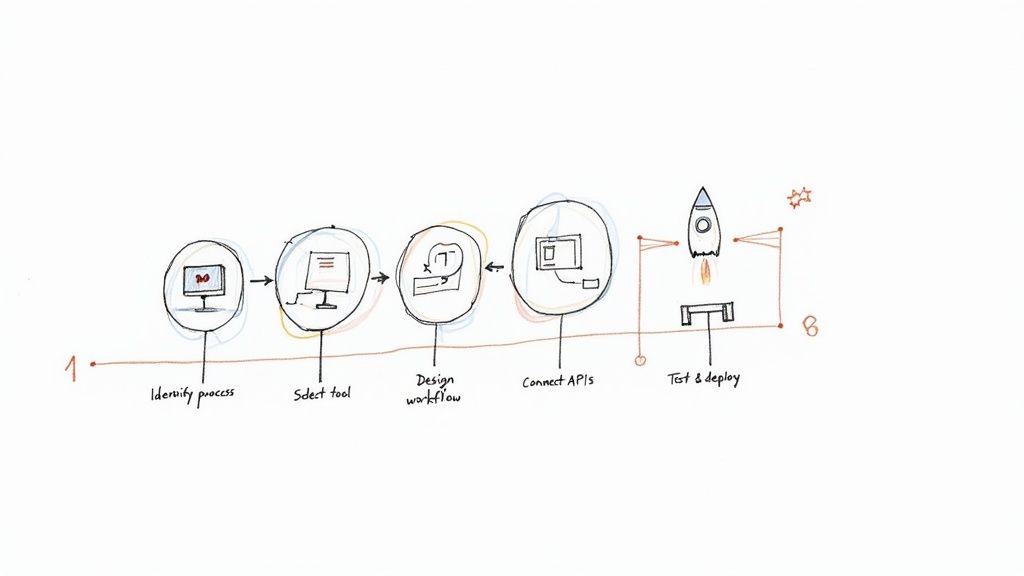
Step 1: Identify and Map Your First Process
First things first, pick your starting point. The sweet spot is a process that's both high-impact and low-complexity. Look for workflows that cause constant headaches—the ones that frequently stall, are riddled with human error, or just burn up too much time with manual work. Those are your prime candidates.
Once you have one in mind, map it out from beginning to end. Don't leave anything out. Take a simple customer return process, for example:
- A customer fills out a return request on the website.
- A support agent reviews and approves it.
- The system automatically generates a shipping label and emails it out.
- The warehouse team inspects the item when it arrives.
- Finance gets a notification to process the refund.
- The inventory count gets updated.
Writing down every action, decision, and system involved creates the blueprint for your automation. Getting this clarity upfront is absolutely essential for a successful project.
Step 2: Select the Right Orchestration Tool
With your process map in hand, it's time to find the right tool for the job. Not all orchestration platforms are built the same, so the best choice really hinges on your team's needs and the software you already use.
Here's what to look for:
- Integration Support: Does it have ready-made connectors for your everyday apps like Jira, Salesforce, or Slack? If not, how easy is it to connect to other systems using APIs?
- Ease of Use: Is the interface intuitive? A visual, low-code workflow designer is a game-changer because it lets both technical folks and business users build and tweak processes together.
- Scalability: Will the tool grow with you? It needs to handle your simple workflow today but also be powerful enough for more complex, high-volume processes down the road without slowing down.
For teams already living in Jira, a tool like Harmonize Pro's Nesty is a great fit because it’s built specifically to orchestrate work inside that ecosystem. You can see how these tools are set up by checking out the Nesty getting started documentation.
Step 3: Design and Build the Workflow
Now for the fun part: turning that map into a real, functioning workflow. In your chosen tool, you'll start dragging and dropping steps, arranging them in sequence, and defining the rules that govern how the process flows.
This is where you connect all the dots. You’ll set up API calls to move data between systems—like grabbing customer details from your CRM to auto-populate a task in your project manager. You’ll also build in conditional logic, like "if the return is approved, then send the shipping label; otherwise, send the customer an email explaining why."
This design phase is where the "conductor" truly gets its sheet music. Every instruction, dependency, and handoff is explicitly defined, ensuring the process runs exactly as intended every single time.
Step 4: Test and Deploy Iteratively
Never roll out a new orchestrated process without putting it through its paces first. Test every possible scenario you can think of, especially the ones where things go wrong. What happens if an API call fails or a critical piece of data is missing? A good workflow needs solid error handling to manage those exceptions without a complete meltdown.
Kick things off with a small pilot program. Let a limited group of users or a small batch of cases run through the new workflow. This gives you a safe space to find bugs, gather feedback, and make adjustments. Once you're confident it's running smoothly, you can open it up to everyone else. This cycle—build, test, learn, repeat—is the fastest way to a successful rollout.
Real-World Use Cases in Finance and E-commerce
Theory is great, but the real magic of process orchestration happens when you see it untangling complex, real-world problems. Let’s look at how it delivers a serious impact in two industries that live and die by their speed, accuracy, and customer experience: finance and e-commerce. These examples show how orchestration turns a spaghetti-like mess of multi-system workflows into a smooth, automated operation.
This isn't just some niche tech. It’s a core part of modern business, especially in data-heavy sectors. In the Banking, Financial Services, and Insurance (BFSI) world, process orchestration already commands over 25% of the global market share. With 65% of these companies wrestling with disconnected workflows, it's no wonder they're turning to orchestration to stitch their systems together. Managers are seeing real results, like 15% efficiency gains in just a few months. You can dig into more data on the process orchestration market at Market Research Future.
Transforming Finance With Orchestrated Loan Processing
If you've ever applied for a loan, you know the process can be painfully slow and manual. It bounces between departments—sales, underwriting, compliance—and involves a whole collection of separate systems for credit checks, ID verification, and fraud detection.
The Challenge: A typical loan application can easily get stuck for weeks. An underwriter waits for a document, only to find it's the wrong one, and the whole thing grinds to a halt. Every single delay increases the odds of a frustrated customer walking away and going to a competitor.
The Orchestrated Solution:
An orchestration engine acts as the central conductor for the entire loan approval lifecycle.
- Initiation: The moment an application is submitted online, the orchestrator kicks off several workflows at once.
- Verification: It makes an API call to a credit bureau for a score while simultaneously hitting another service to verify the applicant's identity against government records.
- Decisioning: All that data gets packaged up and routed to an underwriter. If the loan is approved, the orchestrator automatically generates the final documents and sends them out for an e-signature.
- Funding: Once the documents are signed, it pings the finance system to release the funds and creates a new account in the core banking platform.
This end-to-end automation does more than just make things faster. It creates a perfect, auditable trail for every single application, which is a massive win when the regulators come knocking.
The chart below from Market Research Future gives you a sense of just how big the market for process orchestration is, highlighting its heavy use across industries like BFSI.
This data shows the serious financial commitment companies are making, with the banking and finance sector leading the way in using orchestration to modernize their operations.
Streamlining E-commerce Order Fulfillment
For any e-commerce business, the moment a customer clicks "buy" is just the start of a pretty complex journey. Getting that order from a warehouse shelf to the customer's front door means coordinating inventory systems, payment gateways, shipping carriers, and customer emails.
The Challenge: One tiny mistake—selling an item that just went out of stock or forgetting to send a shipping notification—can completely sour the customer experience and earn you a one-star review. Without orchestration, these steps are often a patchwork of manual spreadsheet checks and siloed software that don't talk to each other.
The Orchestrated Solution:
A process orchestrator can manage the entire fulfillment workflow from a single dashboard, ensuring nothing falls through the cracks.
- It first confirms the payment went through successfully.
- Then, it checks inventory levels in real-time to reserve the product.
- It routes the order details to the correct warehouse management system.
- As soon as a shipping label is created, it grabs the tracking number and fires off an email and SMS update to the customer.
- Finally, it updates the order status in the customer's account portal so they can check on it themselves.
This kind of tight coordination turns a potentially chaotic scramble into a reliable, efficient, and transparent operation that actually builds customer trust.
The Anatomy of an Orchestration System
To really get what process orchestration is all about, it helps to pop the hood and see what’s inside. These platforms can seem like magic, but they’re actually built on a few core components that work together to bring your workflows to life. Understanding this architecture helps everyone, from business leaders to developers, see how these systems are so resilient and scalable.

At the very center of it all is the orchestration engine. Think of it as the brain or the central nervous system of the entire operation. This is the component that actually executes the workflows you design, keeps track of where every single process is at any given moment, and makes decisions based on the rules you’ve set.
The engine takes your process model—the blueprint for your workflow—and turns it into a living, breathing sequence of actions. It knows exactly which task to run next, what data needs to be passed along, and how to handle any hiccups or errors that pop up. Without a solid engine, you’ve just got a static diagram. With one, you have a dynamic, automated process.
The Orchestration Engine: The Brain of the Operation
This engine does more than just run tasks. It juggles several critical functions that are absolutely essential for managing complex, long-running processes.
- State Management: The engine keeps tabs on the current status of every workflow instance. If a process needs to pause for three days to wait for a customer response, the engine remembers exactly where it left off and what needs to happen when it resumes.
- Task Execution: It’s responsible for kicking off tasks, whether that means calling an external API, assigning a ticket to a person, or running a piece of internal code.
- Error Handling and Retries: When a task fails—maybe a service it relies on is temporarily offline—the engine can automatically retry the task. If that doesn't work, it can trigger a predefined compensation action to undo previous steps, keeping everything clean.
This "brain" is what makes the whole system so reliable. It ensures that even if one small part of the process hits a snag, the entire workflow doesn't come crashing down. That’s the kind of stability modern business operations absolutely demand.
Connectors and APIs: The Bridges to Everywhere
An orchestration engine is pretty useless if it can’t talk to the outside world. That's where connectors and APIs come in. They act as the essential bridges that allow the engine to communicate with all your different applications, databases, and microservices.
Connectors are often pre-built integrations that make it easy to link up with common platforms like Salesforce, Slack, or Jira. APIs (Application Programming Interfaces), on the other hand, provide a universal language for software to communicate, letting the orchestrator send and receive data from just about any modern tool. For example, a trigger can be set up to send a notification when a step is done; you can see a real-world example of this in the documentation on how to configure a trigger notification.
These bridges are what turn a theoretical model into a practical tool. They let you coordinate real work across your entire tech stack, finally breaking down those frustrating silos between different systems.
Design Patterns for Bulletproof Resilience
Finally, modern orchestration systems don't just wing it. They rely on proven design patterns to handle tricky situations with grace. One of the most important patterns you'll hear about is the Saga pattern, which is a clever way to manage transactions that span multiple, separate services.
The Saga pattern is all about maintaining data consistency across different systems without having to lock everything down. If one step in a multi-part process fails, the saga triggers a series of compensating actions that roll back the changes made by the previous steps, putting everything back into a consistent state.
Picture this: you're booking a trip that involves a flight, a hotel, and a rental car. That’s three separate transactions. If the flight and hotel book successfully but the car rental fails, you don't want to be stuck with the first two. The Saga pattern automatically cancels the flight and hotel reservations, ensuring you aren't charged for an incomplete booking. This is the kind of rock-solid, fault-tolerant logic that lets you trust orchestration with your most critical business operations.
A Few Lingering Questions About Process Orchestration
Even after getting a handle on the basics, a few questions tend to pop up. Let's tackle them head-on to clear up any confusion and give you a complete picture of how orchestration works in the real world.
One of the biggest points of confusion is the difference between Business Process Management (BPM) and process orchestration. Think of it like this: BPM is the master blueprint. It’s the strategic discipline of designing, analyzing, and improving how your business gets things done.
Process orchestration, on the other hand, is the engine that brings that blueprint to life. It’s the technical "how" that coordinates all your different systems and services to execute the plan. BPM defines the what and why; orchestration is the tool that makes it happen.
Isn't This Just for Big Companies?
Not anymore. It used to be that only huge corporations with massive budgets could afford this kind of technology. But modern cloud-based and low-code platforms have completely changed the game, putting powerful orchestration tools within reach for small and medium-sized businesses.
An SMB can see a huge impact by starting with just one critical workflow—like automating customer onboarding or invoice processing. This simple step can free up key people and slash costly manual errors, all without needing a giant IT team to run the show. The trick is to start small and let the wins fund your next move.
A common myth is that orchestration has to be a massive, all-or-nothing project. The reality is you can take it one step at a time. Modern tools let you automate one process, prove its value, and use that success to justify the next one.
How Do I Actually Measure the ROI?
You can’t improve what you don’t measure. To prove the value of process orchestration, you need to track clear Key Performance Indicators (KPIs) that are tied directly to the goals you set from the beginning. Don't just automate for automation's sake.
Here are a few metrics that really show the impact:
- Reduced Process Cycle Time: How much faster does a task get done from start to finish? For example, did your loan approval time drop from 10 days to 2?
- Lower Error Rates: This is a direct measure of improved quality and less time spent on rework. Are you seeing fewer data entry mistakes in customer records?
- Direct Cost Savings: How many hours of manual work have you eliminated? Multiply those hours by a blended employee salary to put a dollar figure on it.
- Increased Throughput: How many more processes can your team complete in the same amount of time? Can your onboarding team now handle 20 new clients a week instead of 10?
The best orchestration platforms have built-in dashboards that track these KPIs for you. This makes it incredibly easy to show stakeholders the tangible ROI and prove how much more efficient your operations have become.
Turn your complex Jira workflows into efficient, self-managing processes with Harmonize Pro. Our Nesty app transforms static tickets into dynamic, automated workflows that keep teams aligned and deliver results faster. Start streamlining your cross-team collaboration today.