
10 Actionable Release Management Best Practices for 2025
In today's fast-paced software development environment, a chaotic release process is a direct path to production failures, team burnout, and missed deadlines. The difference between a smooth, predictable deployment and a stressful, all-hands-on-deck emergency often comes down to the underlying process. Adopting modern release management best practices is no longer a luxury, it's a necessity for teams aiming to deliver high-quality software reliably and efficiently.
This article moves beyond generic advice to provide a prioritized, actionable collection of 10 best practices tailored for software teams using Jira. We will explore concrete strategies for everything from automated gating and environment promotion to rollback safety and stakeholder communication. Each section is designed to give you a clear roadmap for improving your release pipeline.
You will learn not just what to do, but how to implement these practices. We will provide specific examples and implementation tips, showing you how to turn theory into automated, repeatable workflows that drive real results. Whether you are a release engineer, a product manager, or part of a development team, these insights will help you establish a more resilient, predictable, and efficient release management system. This guide is your blueprint for transforming release cycles from a source of anxiety into a well-orchestrated, strategic advantage.
1. Solidify Gating with a Bulletproof Definition of Ready/Done
Ambiguity is the silent killer of efficient software delivery. One of the most impactful release management best practices is to eliminate this ambiguity at the start and end of the development cycle with a rigorous Definition of Ready (DoR) and Definition of Done (DoD). These aren't just conceptual agreements; they are enforceable quality gates that ensure work only proceeds when it meets specific, predefined criteria.
A strong DoR prevents developers from starting work on ill-defined tasks, a primary source of rework. A robust DoD ensures that what’s handed off to QA or operations meets a consistent quality standard, preventing a cascade of defects downstream.
Implementing DoR and DoD in Jira
To make these definitions effective, integrate them directly into your workflow so compliance becomes automatic, not a manual checklist item.
-
Definition of Ready (DoR): This gate ensures an issue is fully prepared for development. Before a ticket can be moved to an "In Progress" status, automate checks for conditions like:
- Story points are estimated and assigned.
- Acceptance criteria are clearly defined in a specific field.
- All necessary design mockups or technical specifications are attached.
- The issue is linked to a parent Epic.
-
Definition of Done (DoD): This gate confirms an issue is truly complete before it moves to the next stage (e.g., "In QA" or "Ready for Release"). Your workflow should validate that:
- The associated pull request has been merged.
- Unit and integration test coverage meets a minimum threshold.
- Documentation has been updated (e.g., a linked Confluence page is edited).
- The feature has been successfully deployed and verified in a staging environment.
Actionable Tip: Use a tool like Harmonize Pro to create automated workflow validators in Jira. Configure these gates to physically prevent a user from transitioning an issue if its DoR or DoD criteria are not met, displaying a clear message explaining what’s missing. This transforms your process from a suggestion into an enforceable, consistent standard that strengthens your entire release pipeline.
2. Adopt Semantic Versioning for Predictable Releases
Inconsistent versioning creates confusion and risk. Adopting Semantic Versioning (SemVer) is a core release management best practice that replaces ambiguity with a clear, communicative standard. It establishes a shared language for the scope and impact of changes, making dependency management predictable and safe.
The SemVer specification uses a simple MAJOR.MINOR.PATCH format. Each number carries a specific meaning: a MAJOR version signals incompatible API changes, a MINOR version adds functionality in a backward-compatible manner, and a PATCH version introduces backward-compatible bug fixes. This structure immediately tells stakeholders whether an upgrade will require significant development effort or is a low-risk patch.
Implementing Semantic Versioning in Your Workflow
Integrate SemVer into your CI/CD pipeline to make versioning an automated reflection of your code's evolution.
-
MAJOR (e.g., 2.0.0): Reserved for breaking changes. This could be removing an API endpoint, changing a function signature, or altering expected behavior. A MAJOR release signals to users that they will need to modify their own code to upgrade.
- Example: A microservice changes a core API endpoint from
/v1/usersto/v2/users, breaking all existing integrations.
- Example: A microservice changes a core API endpoint from
-
MINOR (e.g., 1.2.0): Used for adding new, backward-compatible features. Users can adopt this version without fear of their existing implementation breaking.
- Example: A new, optional field is added to an API response, or a new, non-breaking endpoint is introduced.
-
PATCH (e.g., 1.1.2): Intended for backward-compatible bug fixes. This is the safest upgrade, as it only corrects existing, unintended behavior.
- Example: A calculation error is fixed, or a security vulnerability is patched without altering any features.
Actionable Tip: Automate version bumping as part of your CI/CD pipeline. Use tools that analyze commit messages (following conventions like Conventional Commits) to automatically determine if a change is a fix (PATCH), a feature (MINOR), or a breaking change (MAJOR). Configure your pipeline to fail the build if a commit message lacks the proper format. This removes human error and ensures your version number accurately reflects the code changes within the release.
3. Automate and Standardize Release Notes and Documentation
A release is only as good as its communication. Neglecting to clearly document what has changed creates a knowledge gap that impacts everyone. One of the most critical release management best practices is to treat documentation as an integrated, automated part of the delivery pipeline, ensuring transparency and reducing post-release friction.
Comprehensive release notes explain what's new, fixed, or deprecated, giving stakeholders clear insight into the value delivered. This practice builds trust, helps users adopt new features, and significantly reduces the burden on your support and customer success teams by preemptively answering common questions.
Automating Documentation in Jira
Generate documentation directly from the work being done in Jira. This removes the manual toil and risk of human error associated with compiling notes at the last minute.
- Step 1: Standardize Issue Data: Enforce that all development tickets have a user-facing "Summary" field and are correctly categorized with labels (e.g.,
bug-fix,new-feature,security-patch). - Step 2: Automate Compilation: Set up a script or workflow that, upon a version release in Jira, queries all associated issues. The script should group issues by their labels.
- Step 3: Generate Different Views: Use templates to format the compiled data for different audiences:
- Technical View: Include issue keys, summaries, and links to pull requests for the development team.
- Business-Friendly View: Exclude technical jargon and focus on the user-facing summaries, grouped by "New Features" and "Bug Fixes."
- Support Team Summary: Add a section for potential user impact or required troubleshooting steps.
Actionable Tip: Use Harmonize Pro to create automated post-release workflows that generate and distribute release notes. You can configure a rule that triggers upon a version release in Jira, automatically gathering all associated issues, formatting them according to a predefined template (e.g., separating "Bug Fixes" from "New Features"), and then posting the formatted notes directly to a Confluence page or a Slack channel. This ensures documentation is always timely, accurate, and consistently formatted.
4. Feature Flags and Progressive Rollouts
Decoupling deployment from release is one of the most powerful strategies in modern software delivery. A core component of any robust release management best practices is the use of feature flags and progressive rollouts. This approach allows teams to deploy code into production without making the features visible to all users, fundamentally reducing the risk of a "big bang" release.
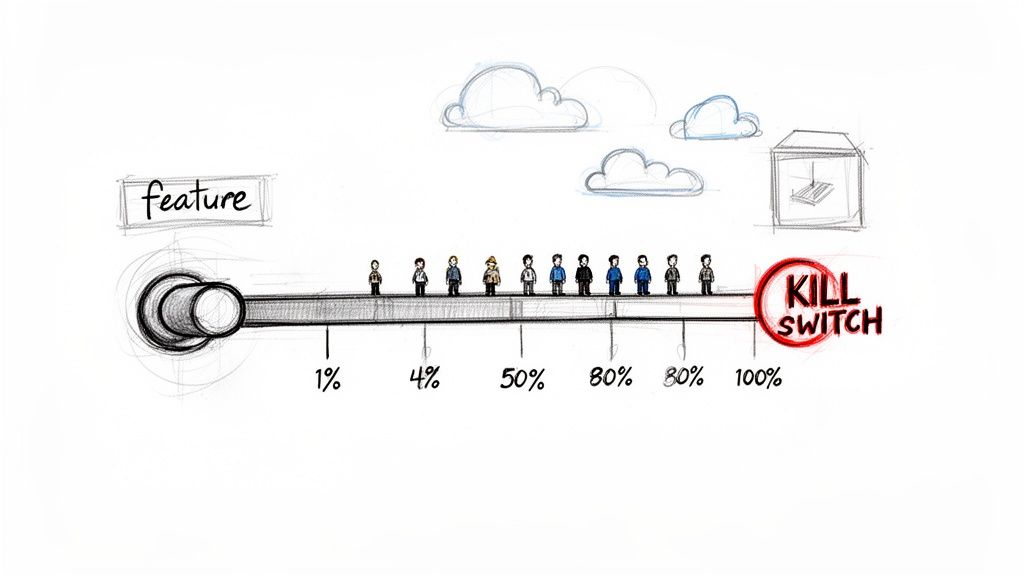
Feature flags act as dynamic on/off switches for functionality. Progressive rollouts, like canary releases, leverage these flags to expose new features to a small subset of users gradually. This controlled exposure allows you to monitor performance, gather feedback, and validate stability before a full-scale launch.
Implementing Feature Flags and Progressive Rollouts
Make releases a non-event by testing new code with live production traffic under controlled conditions.
- Step 1: Wrap New Code in a Flag: Before merging, ensure all new functionality is enclosed within a feature flag, which is disabled by default in production.
- Step 2: Define a Rollout Plan: For each feature, create a simple rollout plan. Start by enabling the flag for an internal test group, then expand to 1% of users.
- Step 3: Monitor and Scale: Before increasing the rollout percentage (e.g., to 10%, 50%), check a predefined dashboard for negative signals like increased error rates or latency. If any metric degrades, immediately disable the flag.
- Step 4: Automate Cleanup: Once a feature is 100% rolled out and stable for a set period (e.g., two weeks), trigger a process to remove the old flag from the codebase to reduce technical debt.
Actionable Tip: Connect your feature flag status directly to your Jira issues. Use Harmonize Pro to create a "Feature Flag Status" custom field. Then, configure workflow automations that transition the Jira ticket (e.g., to "Ready for Cleanup") once your feature flag management tool (like LaunchDarkly or Split.io) reports the flag has been at 100% rollout for a set period. This automates the flag lifecycle management process and prevents technical debt from accumulating.
5. Achieve Consistency with Environment Parity and Infrastructure as Code
The notorious "it worked on my machine" problem is a direct symptom of inconsistent environments. A critical release management best practice is to actively pursue environment parity: ensuring your development, staging, and production environments are as identical as possible. This systematically eliminates a whole class of release-day surprises.
Achieving this parity manually is nearly impossible. Infrastructure as Code (IaC), using tools like Terraform or AWS CloudFormation, is essential. By defining your infrastructure through code, you make your environments reproducible, version-controlled, and auditable.
Implementing IaC for Predictable Releases
Move from manually configured servers to automated, version-controlled environment definitions.
- Step 1: Containerize Your Application: Use Docker to package your application and its dependencies into a single, portable container. This is the first and most critical step toward consistency.
- Step 2: Define Infrastructure in Code: Write Terraform or CloudFormation scripts to define your entire environment, including networking rules, load balancers, and database configurations. Store this code in a Git repository.
- Step 3: Automate Environment Creation: Integrate your IaC scripts into your CI/CD pipeline. Configure the pipeline to automatically spin up a fresh, production-identical environment for every pull request to run integration tests.
- Step 4: Manage Secrets Securely: Do not hardcode secrets like API keys or database passwords. Use a secrets manager (like AWS Secrets Manager or HashiCorp Vault) and inject these values into the environment at runtime.
Actionable Tip: Store your Infrastructure as Code (e.g., Terraform or CloudFormation files) in the same Git repository as your application code, or a closely linked one. Create a dedicated Jira issue type, like "Infra Change," to track and manage modifications to your environments. Use a Harmonize Pro workflow to enforce that any "Infra Change" issue requires peer review and successful execution in a staging environment before it can be approved for production deployment. This brings visibility and governance to infrastructure changes, treating them with the same care as application code changes.
6. Release Planning and Schedule Adherence
Unpredictable releases create chaos for stakeholders and erode trust. A foundational release management best practice is to establish and adhere to a structured release plan and schedule. This moves teams from a reactive, "it's done when it's done" model to a proactive, predictable cadence that aligns the entire organization.
A well-defined schedule sets clear expectations for feature scope, quality criteria, and communication timelines. A predictable rhythm allows marketing, sales, and support teams to plan their own activities effectively, preventing last-minute scrambles.
Implementing a Release Cadence in Jira
Make the timeline transparent and the deadlines non-negotiable by building them into your tools.
- Establish a Release Calendar: Create a shared, visible calendar in Confluence or Google Calendar that outlines all key dates for the next quarter. This includes not just the final release date but also critical milestones like feature freeze and code freeze.
- Define and Enforce Freeze Periods:
- Feature Freeze: One week before the planned release, no new feature tickets can be added to the release version in Jira. The focus shifts entirely to bug fixing and stabilization.
- Code Freeze: 48 hours before release, only merges related to critical, release-blocking bugs are permitted. This minimizes the risk of introducing last-minute regressions.
Actionable Tip: Use Jira's Fix Versions to manage scope and track progress against your release schedule. You can create dashboards that show the status of all issues slated for a specific version. For process enforcement, use Harmonize Pro to create workflow validators that prevent issues from being added to a release after the feature freeze date has passed, automatically enforcing your established timeline and protecting release integrity.
This structured approach, which you can learn more about through various best practices in Jira, balances the need for agility with the predictability required by the business.
7. Institute Robust Rollback and Disaster Recovery Plans
Even with the best testing, things can go wrong in production. A critical component of modern release management best practices is planning for failure. Having a robust, tested, and rapid rollback strategy is what separates mature engineering organizations from those who simply hope for the best. The goal is to minimize the mean time to recovery (MTTR) and protect the end-user experience.
A well-rehearsed plan ensures that a failed deployment is a minor incident, not a catastrophic outage.
Implementing Proactive Recovery Strategies
Make recovery procedures automated and predictable.
- Step 1: Define Rollback Triggers: In your monitoring tool, define specific alert conditions that will trigger a rollback (e.g., API error rate exceeds 5% for 5 minutes, p99 latency doubles).
- Step 2: Automate the Rollback: Create a one-click rollback script or pipeline job that redeploys the previous stable version of the application. Ensure this process is automated and does not require manual SSH access.
- Step 3: Conduct Regular DR Drills: Schedule quarterly "game days" where you intentionally simulate a failure in the staging environment (e.g., delete a database, take down a service) and execute your recovery plan. Document the time it takes to recover and identify areas for improvement.
- Step 4: Plan for Data Migrations: For releases involving database schema changes, have a tested script ready to revert the migration or a forward-fix script to correct data issues without data loss.
Actionable Tip: Use your Jira workflow to manage incident response. Create a dedicated "Incident" issue type with a predefined workflow that guides the team through diagnosis, escalation, rollback execution, and post-mortem analysis. Link these incident tickets directly to the release tickets in Harmonize Pro to create a clear audit trail, making it easy to identify which release caused the issue and ensuring the post-mortem action items are tracked to completion.
8. Formalize Change Management and Communication
A technically perfect release can still fail if it surprises stakeholders. A critical release management best practice is implementing a formal change management and communication process. This framework ensures that every release is documented, approved, and clearly communicated.
Effective change management involves a structured process for evaluating the impact of changes, securing necessary approvals, and notifying all affected parties with the right information at the right time.
Implementing Change Communication in Jira
Integrate your communication plan directly into your release workflow to ensure no step is missed.
-
Pre-Release Communication Checklist: Before deployment, your release ticket must confirm that:
- The Change Request (CR) is documented with a risk and impact analysis.
- Approvals from key stakeholders (e.g., Head of Product, QA Lead) are recorded on the Jira ticket.
- A pre-release notification has been sent to an internal
eng-release-updatesSlack channel. - The customer-facing release notes have been drafted and linked in Confluence.
-
In-Flight & Post-Release Communication:
- Automate messages to the Slack channel for "Deployment Started," "Deployment Successful," and "Rollback Initiated."
- Update a central status page (like Statuspage.io) in real-time during the deployment.
- After a successful release, automatically send an email to the customer success team with a link to the finalized release notes.
Actionable Tip: Automate your stakeholder notifications using post-functions in your Jira release workflow. For instance, when a "Release" issue is transitioned to "In Progress," a post-function can automatically send a templated email to a stakeholder distribution list and post a message in a dedicated Slack channel. This ensures timely, consistent communication without manual effort. Learn more about how to best manage these kinds of Jira workflow changes to support your processes.
9. Monitoring, Observability, and Metrics-Driven Releases
Deploying software without a robust monitoring strategy is like flying blind. A critical release management best practice is embedding deep monitoring and observability into your process. This means creating a rich, data-driven view of your system's performance, health, and user impact before, during, and after a release.
This proactive approach allows teams to detect anomalies instantly, understand the real-world impact of their changes, and make informed decisions about whether to proceed, pause, or roll back a deployment.
Implementing Metrics-Driven Releases
Tie monitoring data directly to your release process to measure every deployment against clear success criteria.
-
Step 1: Create a Release Dashboard: Before each release, create a temporary or version-specific dashboard in your monitoring tool (e.g., Datadog, Grafana) that consolidates all key metrics. This should include:
- Technical Metrics: Application error rates (e.g., 4xx, 5xx), API latency (p95, p99), and container CPU/memory usage.
- Business Metrics: User sign-ups per minute, conversion rates, or items added to cart.
- SLO/SLI: A chart showing your performance against your Service Level Objectives.
-
Step 2: Establish a Baseline: One hour before release, take a snapshot of the dashboard metrics to establish a clear "before" state.
-
Step 3: Monitor During and After Release: During the deployment and for at least one hour afterward, the release team should actively watch this dashboard. Compare the live metrics against the baseline to spot deviations immediately.
-
Step 4: Set Automated Alerts: Configure alerts to automatically notify the on-call team if any key metric breaches a predefined threshold (e.g., "5xx error rate > 2% for 3 minutes").
Actionable Tip: Connect your monitoring platform's alerts to your Jira workflow. Using a tool like Harmonize Pro, you can configure an automation that automatically creates a high-priority "Incident" or "Bug" issue in Jira when a critical alert is triggered post-release. This rule can pre-populate the ticket with alert details and assign it to the on-call engineer, bridging the gap between observability and incident response and ensuring nothing falls through the cracks.
10. Release Coordination and Cross-functional Collaboration
Software delivery is a team sport, yet many organizations operate in functional silos. A critical release management best practice is to actively engineer cross-functional collaboration. This means creating a system where development, QA, operations, and product management work as a unified force toward a shared release goal.
A well-coordinated release process ensures everyone understands their role, dependencies are managed proactively, and the entire team shares ownership of the outcome.
Implementing a Collaborative Release Framework
Embed communication and shared responsibility directly into your release cadence.
- Step 1: Appoint a Release Lead: For each release, designate one person as the Release Lead. This person is not responsible for doing all the work but for coordinating activities, running meetings, and being the single point of contact for status updates.
- Step 2: Define Roles with a RACI Matrix: Create a simple RACI (Responsible, Accountable, Consulted, Informed) chart in Confluence for key release activities. For example:
- Go/No-Go Decision: Accountable: Release Lead. Consulted: QA Lead, Eng Lead.
- Run Deployment Script: Responsible: On-call SRE. Informed: All.
- Step 3: Run Cadenced Meetings:
- Release Kickoff (Pre-release): A 30-minute meeting to review the release scope and confirm the timeline.
- Go/No-Go Check-in (1 hour before release): A 15-minute sync to confirm all systems are ready.
- Retrospective (Post-release): A 45-minute meeting to discuss what went well, what didn't, and create actionable improvement tickets in Jira.
Actionable Tip: Formalize your release process within Jira by creating a dedicated "Release" issue type. Use a tool like Harmonize Pro to build a workflow that automates stakeholder notifications and enforces sign-offs. For example, you can configure a status transition that automatically alerts the Product, QA, and Ops leads via Slack and requires their formal approval on the Jira ticket before the release can proceed to the "Ready for Deployment" stage.
10-Point Release Management Best Practices Comparison
| Practice | 🔄 Implementation complexity | ⚡ Resource requirements | 📊 Expected outcomes | ⭐ Ideal use cases | 💡 Key advantages / Tips |
|---|---|---|---|---|---|
| Automated Testing and Continuous Integration | High — CI pipelines + test suite maintenance | High — CI runners, test infra, developer time | 📊 High — early bug detection, faster feedback, fewer regressions | ⭐ Frequent deploys, large codebases, teams seeking reliability | 💡 Start with critical-path tests; aim ~80% core coverage; parallelize tests |
| Semantic Versioning | Low — rules and discipline to follow | Low — tooling for bumps/changelogs | 📊 Medium — clear upgrade signals, easier dependency management | ⭐ Public APIs, libraries, package ecosystems | 💡 Document breaking changes; automate version bumps and changelogs |
| Release Notes and Documentation | Medium — coordination and writing effort | Medium — writer/time + tooling to publish | 📊 Medium — improved adoption, fewer support requests | ⭐ User-facing products, enterprise releases, major feature sets | 💡 Automate notes from PRs; write during development; highlight security fixes |
| Feature Flags and Progressive Rollouts | Medium–High — integrates into codepaths and infra | High — flag system, targeting, monitoring | 📊 High — reduced rollout risk, safer experiments, quick rollback | ⭐ Large user bases, A/B tests, gradual feature exposure | 💡 Enforce flag lifecycle, start at 1% rollouts, monitor metrics closely |
| Environment Parity and Infrastructure as Code | High — IaC design and environment alignment | Medium–High — IaC tooling, infra, expertise | 📊 High — reproducible environments, fewer "works-on-my-machine" bugs | ⭐ Multi-environment stacks, complex infra, onboarding-heavy teams | 💡 Use containers, version all configs, test IaC changes in non-prod |
| Release Planning and Schedule Adherence | Medium — process definition and coordination | Low–Medium — PM time, calendars, release tooling | 📊 Medium — predictability, better resource allocation, fewer surprises | ⭐ Organizations needing predictable cadence and stakeholder planning | 💡 Publish a release calendar, define feature/code freeze windows, build buffers |
| Rollback and Disaster Recovery Planning | High — complex runbooks and tested procedures | High — backups, DR infra, automation & drills | 📊 High — reduced MTTR, lower business impact, clearer incident response | ⭐ Mission-critical systems, regulated or high-availability services | 💡 Define rollback metrics, test recovery quarterly, maintain up-to-date runbooks |
| Change Management and Communication | Medium — approval workflows and impact analysis | Medium — documentation, comms channels, governance | 📊 Medium — improved awareness, auditability, reduced surprises | ⭐ Enterprises, regulated environments, cross-team impacts | 💡 Tailor formality to risk, use multiple channels, publish impacts and rollback info |
| Monitoring, Observability, and Metrics-Driven Releases | High — instrumentation, dashboards, tracing | High — storage, tooling (APM/metrics/logs), analyst/SRE effort | 📊 High — early detection, data-driven decisions, faster RCA | ⭐ Distributed systems, production-critical applications | 💡 Define key metrics pre-release; create release-specific dashboards; avoid alert fatigue |
| Release Coordination and Cross-functional Collaboration | Medium — roles, meetings, shared processes | Medium — shared tools, coordination time | 📊 Medium — smoother releases, faster issue resolution, better alignment | ⭐ Cross-functional teams, large or distributed orgs | 💡 Assign a release manager, use RACI, share status via common platforms |
Turn Best Practices into Your Daily Workflow
Navigating the complexities of modern software delivery requires more than just good intentions; it demands a structured, strategic approach. Throughout this guide, we've explored ten critical release management best practices, moving from high-level concepts to tangible, in-the-weeds actions your team can take. We've seen how integrating automated testing and CI/CD pipelines forms the bedrock of a reliable process, and how semantic versioning brings clarity and predictability to your release cadence. The journey doesn't stop there; it extends to crafting meticulous release notes, leveraging the power of feature flags for progressive rollouts, and ensuring environment parity through Infrastructure as Code.
The core message is clear: transforming your release process from a source of anxiety into a competitive advantage is an achievable goal. It’s about shifting from a reactive stance, where teams scramble to fix post-deployment issues, to a proactive one built on foresight and control. This means embracing robust rollback plans, instituting clear change management protocols, and fostering a culture of transparent communication across all functions. Each practice, from release planning to cross-functional collaboration, serves as a pillar supporting a more resilient, efficient, and predictable delivery pipeline.
From Theory to Tangible Results
Adopting these release management best practices is not an all-or-nothing proposition. The key is to start small, identify your most significant pain point, and apply a targeted solution.
- Is communication a bottleneck? Start by formalizing your change management and communication plan (Practice #8). Implement a clear sign-off process within Jira for key stakeholders before a release candidate is promoted.
- Are post-release bugs causing chaos? Double down on your rollback and disaster recovery planning (Practice #7) and enhance your monitoring and observability stack (Practice #9) to catch anomalies faster.
- Do deployments feel inconsistent? Focus on achieving environment parity with Infrastructure as Code (Practice #5) to eliminate the "it worked on my machine" problem once and for all.
The true value of these practices is realized when they become ingrained in your team's daily workflow, not just a checklist consulted before a major launch. This is where tooling becomes a powerful ally. By embedding these processes directly into your project management environment, like Jira, you lower the barrier to adoption and make the "right way" the easiest way. For instance, creating automated workflows that enforce a Definition of Done before a ticket can move from "In QA" to "Ready for Release" turns a best practice into an unavoidable, everyday reality. This systematic approach cultivates a culture of quality and accountability, where every team member understands their role in safeguarding the release pipeline.
The Strategic Value of a Mastered Release Process
Ultimately, mastering these concepts elevates your release process from a simple operational task to a strategic business function. A well-oiled release machine directly impacts customer satisfaction, developer morale, and the bottom line. Predictable, high-quality releases build trust with your users and allow your product and marketing teams to plan campaigns with confidence. Internally, a low-stress, automated process frees up your engineering talent to focus on innovation and building value, rather than fighting fires and managing manual deployment steps.
By methodically implementing these release management best practices, you are not just shipping code; you are building a resilient, scalable, and reliable delivery engine. You are creating a system that supports growth, mitigates risk, and empowers your entire organization to move faster and more confidently. The path forward is one of continuous improvement, where each release becomes an opportunity to refine your process, learn from data, and deliver even greater value. Your journey toward a world-class release management process starts with the next commit, the next build, and the next deliberate step you take to turn these best practices into your standard operating procedure.
Ready to move beyond manual checklists and embed these best practices directly into your Jira workflow? Discover how Harmonize Pro can help you automate release gating, streamline environment promotion, and build a fully orchestrated release pipeline. See how our Nesty workflow engine can turn your release management strategy into an automated reality at Harmonize Pro.